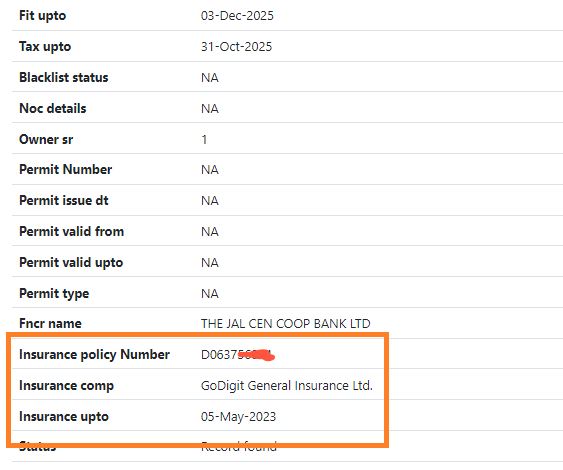
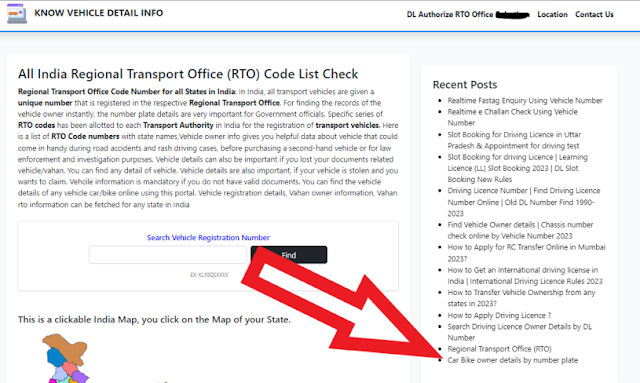
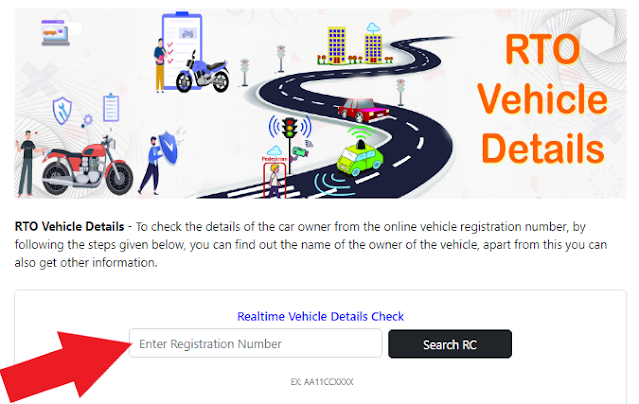
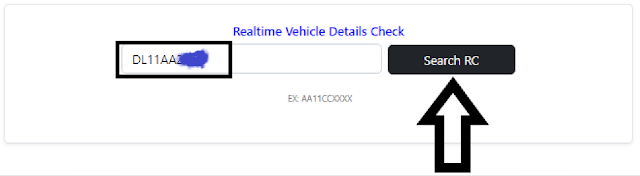
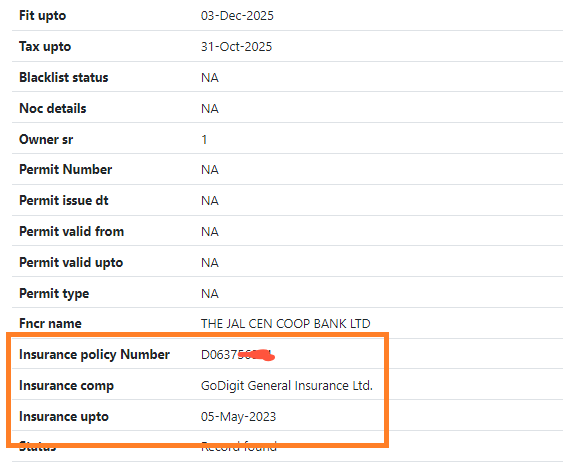
Find insurance policy number by vehicle number
How to find insurance policy number by vehicle number ?
Step 6:- RTO Through Provide Vahan Details For Example Policy Number,
Get comprehensive vehicle services articles including vehicle owner information, blacklisted vehicle check, vehicle challan check, car fastag information and driving license services.
This App through find vehicle owner full information only vehicle plate number
This App through Check FASTag Balance, Status, Check Owner Name, Customer ID, Recharge...
Vehicle Owner Name, Father's/Husband's Name,Current Address, Mobile Number etc. details show.
For all vehicles plying on the road, whether a bike, a car or a heavy motor vehicle, it is mandatory to have an updated pollution certificate. .
Driving License Download online by licence number......
Any Vehicle PUC Validity/application Status check by registration number....
Challan Details After getting challan details you can further go for online payment .
Find insurance policy number by vehicle number
Find VIN Number, Chassis number and Engine Number Online Website -
Online Website Se Kisi Vehicle or Car Bike Ka Chassis Number Check Karane Ke Liye Aap Know Vehicle Detail Info Website per visit kar sakate hai.
Chassis number ki jarurat kai karan se ho jati hai. jaise challan check karna ho, Pollution certificate download karna ho. RC Me mobile number update karna. Rc Download Karna Ho. Koi bhi kaam karna ho vahan se related online to apako registration number ke sath chassis number jarur manga jata hai.
Online find engine number and chassis number using know vehicle details website -
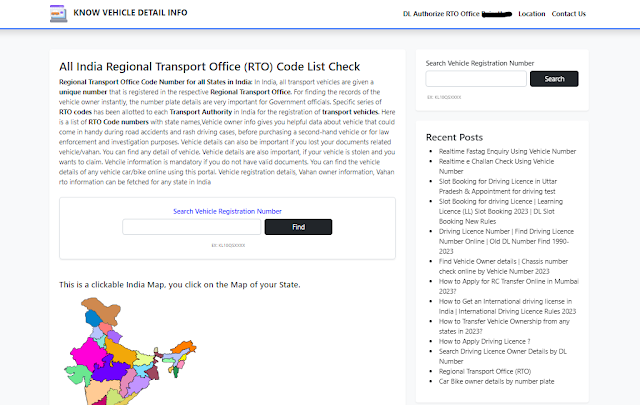
Step 1:- Online Full Chassis Number and Engine Number Search karane ke Liye aap https://know.vehicledetail.info/ this website per visit kar sakate hai.
Step 2:- Enter Registration Number - Me apako gaddi ka plate number enter karna hai, jisako ham registration number ke name se bhi janate hai.
Step 3:- Search VIN - Apako Registration Number enter Karane Ke Baad Search VIN Button per click karna hoga.
Step 4:- Apko ek bar me vahan ka details dekhane ko mil jaye yah jaruri nahi hai atah apko ek se jyda bar apako check karna ho sakata hai.
Step 6:- Apko ek bar me vehicle ka details dekhane ko sayad nahi milega isliye 1-3 bar lagatar try kare tab apko Full VIN Number dekhane ko mil sakata hai. Kyoki Isame server issue jyada rahata hai.
Online Vahan Permit Kaise Check Kare 2024 - Agar Apane Apni Vehicle Per Permit Issue Karwaya Tha, Agar Aap Vahan Ka Permit Check Karna Chahate Hai to Niche Diye Step Ko Follow Kar Sakate Hai.
| क्र.सं. | वाहन का प्रकार | परमिट का अवधि |
|---|---|---|
| (1) | लाइट गुड्स व्हीकल (LGV) | 5 वर्ष 1 वर्ष |
| (2) | भारी माल वाहन | 5 वर्ष |
Vehicle owner address by number plate || Vahan address kaise nikale -
Kya Aap yah check karna chahate hai ki apaki jo vehicle hai, Usape Konasa Address Update Hai, To Aap Kaise Pata Kar Sakate Hai.
Online Vehicle Number Se Vahan Malik Ka Address Check Karane Ke Liye Aap Niche Diye Step Ko Follow Kar Sakate Hai.
Jab Aap New Vehicle Ko RTO Office Me Register Karate Hai, To Us Vehicle Owner Ki All Details Update Ki Jati Hai. Aise Me apako doubt hai to aap online vehicle registration number se full address check kar sakate hai.
Aaj this article me yah janane wale hai ki aap bike or car owner ka address kaise nikal sakate hai. Only Vehicle Registration Number.
Bike insurance number check online - car insurance policy number search by registration number - Enter your vehicle number to search the insurance number from the registration number of the vehicle online.
Do you also want to search or find your vehicle's insurance number or insurance policy number online, then you must read the article till the end and follow the steps, by doing this you can easily find the insurance number of any of your vehicle.
When you get your vehicle insured, or buy or purchase insurance for your vehicle from an insurance company, then you get an Insurance Policy Number or Insurance Number from that insurance company, the insurance company gets to know from this number only.
It is known that your vehicle has been insured, its Insurance Number is this, just as you get a bank account number on opening a new account in the bank, in the same way, you get an Insurance Number on buying insurance, with this number the owner of that vehicle and Vehicle information is linked, all important information is mentioned in it.
There has been a surge in two-wheeler sales over the last few years, and this boom in sales has only increased due to COVID-19.
More people are now preferring to buy and use personal vehicles rather than depend on cabs or public transport for their commute and travel needs. As two-wheelers are easier on the pocket than a car, and are relatively easy to manoeuvre and take care of, they seem to be the vehicle of choice for a large segment of users.
With an increase in two-wheeler sales comes an increase in two-wheeler insurance policies taken. If you’re new to riding a bike and keeping track of insurance,
You might be anxious about the policy period and when your policy expires. But not to worry - everything’s digital now! All the details of your policy can now be found online, and all you’ll need is your bike’s registration number to keep a check on them.
When you first buy your bike, you will have to register your vehicle with your Regional Transport Office. Once you’ve registered,
RTO will issue your two-wheeler with a registration number, which will be displayed on the front and back of your vehicle. Ever wondered what those numbers and letters mean? Let’s take this registration number as an example - DL11AA2023.
DL - The first two letters, such as TN or KA stand for the state within which you registered your two-wheeler.
11 - These two numbers indicate the RTO the vehicle was registered at
AA - This is given to make the registration number unique to you
2023 - This is your two-wheeler’s exclusive registration number
The average two-wheeler insurance policy has a tenure of about a year, within which you will have to renew your policy. If you’d like to keep a check on your policy’s expiry date, you can visit the following platforms and type in your registration number to find the status and expiry date of your two-wheeler insurance policy.
Your Regional Transport Office’s official website
Your State Transport Department’s official website
Insurance Information Bureau’s website. This is the IRDA’s data repository
VAHAN - The official website for the Ministry of Road Transport and Highways
While the RTO and State Transport Department’s website and processes can vary from state to state, websites such as VAHAN and Insurance Information Bureau are applicable pan-India, and so we will run you through how you can check your bike insurance policy and its expiry date online.
This is the official website of the Ministry of Road Transport and Highways, and this platform makes it super simple to check your insurance policy’s status. Here are the steps you need to follow.
Step 1: Visit the Parivahan website
Step 2: Enter your vehicle’s registration number
Step 3: Press “Vahan Search” to proceed
And that’s it! The platform will display your Registration Certificate’s validity and the details of your insurance tenure, including the date of expiry.
It can be overwhelming and tiring to keep a constant check on your bike insurance policy and its date of expiry - more so if you have to rifle through numerous documents and papers to find it. By moving all this information online, the process of keeping your insurance policy in check is not only made easier, but it is also more convenient and a lot quicker than if you were to check your documents manually, or head over to your insurance provider in-person to check on its status.
Once you’ve kept a check on your insurance policy and have noticed that your policy is nearing expiry, what do you do next? You’ll have to renew it. With the support of user friendly technology and digital services, not only is the process of checking on your bike insurance policy made simple but the process of renewing it has been made simple as well. You can now buy and renew your bike insurance policy online with Chola MS, making the whole process quick and hassle-free. All it takes is a few easy steps, and you’ll have your bike insurance in no time.
Easily Check RC Status and Get Vahan Details Online. You can search vehicle Owner Name online.
vahaninfos.com, rtovehicle.info, rtovehicleinformation.com
Vehicle proprietor data gives you supportive information about vehicle that could prove to be useful during street mishaps and rash driving cases, prior to buying a recycled vehicle or for policing examination purposes.
Vehicle subtleties can likewise be significant in the event that you lost your archives related vehicle/Vahan.
You can track down any detail of vehicle. Vehicle subtleties are additionally significant, to guarantee. Vehcile data is required on the off chance that you don't have substantial records.
You can find the vehicle subtleties of any vehicle/bicycle internet utilizing this entry. Vehicle enlistment subtleties, Vahan proprietor data, Vahan rto data can be gotten for any state in India for example Maharashtra, Delhi, Rajasthan, Gujarat, and so forth.
You can also do a vehicle owner search by sending an SMS to VAHAN. Just follow the steps given below to find out vehicle registration details by vehicle number:
So, if you want to know the name of the owner of a vehicle, all that you have to do is note down the vehicle’s registration number and send an SMS to VAHAN.
The procedure to find vehicle owner details online is easy and simple. The Government of India has introduced a central vehicle registry known as VAHAN. This web portal is a central database that holds around 28 crore vehicle data or information.
The primary objective of the Ministry of Road Transport and Highways is to centralise all the information related to the vehicle registration certificates and driving licenses that can be derived from the RTO and DTOs.
Here is a step-by-step guide to find vehicle registration details online through the VAHAN:
Step 1: To check the vehicle owner's name, visit the website of VAHAN
Step 2: At the top navigation menu of the page, click on 'Know Your Vehicle Details
Step 3: On the next page, enter the rc registration number of the car or bike , truck to extract the details
Step 4: Pass the human verification by Enter the Captcha Code and click on 'Search Vehicle' button.
Step 5: The Vehicle owner name details will be on the displayed page. Note them for your convenience.
Do you want to Vehicle owner name by Vehicle Number, By completing the above steps, you will be redirected to a new page. There you can view different types of other details. Below is the list you can find-
Online Find FASTag bank with vehicle number -
To find the FASTag bank associated with a vehicle number online, you can follow these steps:
Are you also recharging fastag, or checking fastag balance or there is any other reason for which you want to check bank name linked with fastag account, then how can you do it.
In today's article, we are going to know that you have to know the registration number of the vehicle which is also known as plate number, vehicle number. You can use how to find the bank name of the fastag of the vehicle.
Your fastag has been issued by the bank / company that has been issued, how can you search the name of that bank or company online.
Step 1. Visit the official website of the National Electronic Toll Collection (NETC) program - https://www.netc.org.in/check-your-netc-fastag-status
Step 2. Click on the "Find your FASTag issuer bank" option under the "Vehicle Registration Number(VRN)" section on the page.
Step 3. Enter the vehicle registration number in the field provided.
Step 4. Enter the CAPTCHA Code displayed on the screen.
Step 5. Click on the "Check Status" button.
The website will display the name of the bank that has issued the FASTag for the given vehicle number. You can also check the same information through the respective bank's website or mobile app, provided you have registered your FASTag account with them.
Alternatively, you can also contact your vehicle dealer or your FASTag issuer to get the details of the issuing bank associated with your FASTag account.
To login to your FASTag portal Customer ID or User ID is required. You need to know this to login to your account and perform various transactions like tag recharge, view transaction history etc.
You get an identification number for the FASTag wallet from the issuing bank along with the FASTag sticker. It consists of 14 digits. Wallet ID for FASTag is sent to the user in the welcome email.
You will get your FASTag sticker Along with that comes a customer ID. You should check the welcome email sent to the email address registered at the time of purchase of FASTag. This email must contain the 12 digit Customer ID.
Log in to the portal of your FASTag issuing bank OR Download the MyFASTag App to recharge the Tag Wallet. You can recharge FASTag wallet online through UPI payment portal, net banking, debit/credit card, NEFT/RTGS etc.
Government of India has made toll payment through FASTag mandatory for four wheelers from 16 February 2021. Also, FASTag is now mandatory for purchasing third-party insurance for vehicles. Thus, you should buy FASTag for automatic toll payment on NHAI highways.
To cross the toll plaza without an active FASTag, you will need to pay double the regular toll in cash. In the initial phase of FASTag launch, toll plazas had only 1 or 2 lanes dedicated for automated toll collection. It allowed vehicles without FASTag to cross toll booths by paying the regular fee in cash. But now the government has made FASTag mandatory on every four wheeler. Thus, if you choose to cross the toll lane with cash payment, the amount will be double the regular charges.
Many issuing banks and other authorized FASTag providers are online. You can check your bank's website to ensure that they provide FASTag. Or, visit the National Payments Corporation of India or NPCI portal to find a list of all FASTag issuing banks.
You can use your registered mobile number to call the customer care number of the FASTag issuing bank to find out the Customer ID.
You can call the customer care number of your FASTag issuing bank to update the vehicle registration number. Carry the RC copy of the vehicle along with it, as it is a mandatory document.
FASTag issuing bank You do not need the vehicle number to know. It will be mentioned on the FASTag sticker itself. So, you can easily know the bank name.
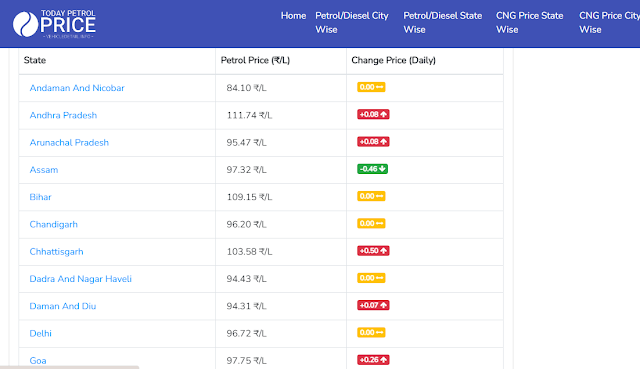
Today Petrol and Diesel Price in India - Check Latest Diesel Rates in India
Check Today Petrol and Diesel Prices in India - Do you want to know what is the price of petrol and diesel in all the cities of India today or whether liters of petrol and diesel are being sold.
You will also know that the price of Petrol Diesel CNG Gas keeps on changing daily, so if you want to know the price of Petrol Diesel CNG Gas in any city or state, how can you check online.
You can check the price of petrol and diesel today from this website, as well as check the list of petrol pumps.
From here you can check the price of petrol in which state.
You can check whether the petrol and diesel price in Konasa City is more or less.
You can check CNG gas price / rate, what is CNG price in all cities.
You can also see this, the price of the petrol that we are getting, we can also see the report of which tax is included. How much tax is imposed by the state and central government.
We also see that the price of petrol is low or high at different fuel stations in the same city. Yadi you want to see that which petrol has low price and which one has high price then you can check from here by petrol pump list option.
| Crude Oil | 40.40₹/Litre |
| Refinery Processing + Refinery Margins + OMC Margin + Freight Cost, Logistics | 3.91₹/Litre |
| Price Charged to Dealers (excluding Excise Duty and VAT) | 44.31₹/Litre |
| Additional: Excise Duty + Road Cess as Charged by Central Government | 32.90₹/Litre |
| Commission to Petrol Pump Dealers | 3.79₹/Litre |
| Fuel Cost Before VAT | 81.01₹/Litre |
| 19.4% VAT (Varies from State to State) | 15.71₹/Litre |
| Final Retail Price | 96.72₹/Litre |