NVSP - RTO Vehicle Info (Parivahan Seva)

This App through find vehicle owner full information only vehicle plate number

FASTAG Service - Apna Smart FASTeg App

This App through Check FASTag Balance, Status, Check Owner Name, Customer ID, Recharge...

Vehicle information by registration number

Vehicle Owner Name, Father's/Husband's Name,Current Address, Mobile Number etc. details show.

How to Download PUC Certificate

For all vehicles plying on the road, whether a bike, a car or a heavy motor vehicle, it is mandatory to have an updated pollution certificate. .

How to Download Driving Licence

Driving License Download online by licence number......

How to Check PUC Status

Any Vehicle PUC Validity/application Status check by registration number....

Vehicle e-Challan Check Status

Challan Details After getting challan details you can further go for online payment .

Monday, February 14, 2022

How to get my physical DL from mparivahan?

 If you have also lost your physical driving license, and you also want to get your physical driving license, then how can you do it, in this we will tell you both the ways online and offline also which will take you better.


How to get my physical DL from mparivahan?

Follow the steps given below to get your physical driving license

Step 1: You can book slot for duplicate driving license from the website of online transport, even after filling that form, you will have to visit the RTO office.

Step 2: If you want, you can book online slot for duplicate driving license, if you are facing problem in doing this then there is no special need, you can directly go to RTO office.

Step 3: What are the documents required to get a duplicate driving license?
          A : Any such ID card that helps in checking the data of your driving license, such as                       Aadhar card, Voter card, PAN card, Passport.

Step 4: What documents are required to be carried while going to the RTO office, One: Payment receipt, slot book receipt, if you have applied for duplicate driving license form online, Second: If you have not filled any form, Duplicate driving license For online then you have One ID Card, if possible driving license number

RTO Office Address Kaise Check Kare aur Helpline Number

If you also want to know the address and helpline number of RTO office of your city, then follow the steps given below.

Step 1: Visit for RTO Office Details check  : Click Here

Step 2: Here you can check by entering your vehicle number or you can also check by selecting your state name and city name.
Step 3:  Here the address and mobile number email address of your city's RTO Office has arrived, now before visiting the RTO Office, you can call the phone number and get complete information about it and then visit, or even directly. you can go there is no such problem


How to keep your driving licence on your smartphone or download its soft copy

Before beginning, it is important to point out that you need to have an account on DigiLocker. You can sign up on DigiLocker using your phone number and Aadhaar card.

  1. Visit the DigiLocker site and sign in with your username and six-digit PIN. You'll then receive a one-time password (OTP) on your registered phone.
  2. Once signed in, click on the Get Issued Documents button.
  3. Now, look for the term “driving licence” in the search bar.
  4. Select the state government from where you have got your driving licence. Alternatively, you can select the All States option.
  5. Enter your driving licence number and hit the Get Document button. Make sure to click on the checkbox to provide your consent to DigLocker to share your data with the issuer before proceeding further.
  6. DigiLocker will now fetch your driving licence from the transport department.
  7. You can now look at your driving licence by going to the Issued Documents list.
  8. The driving licence can be downloaded in soft copy by clicking on the PDF button.
  9. You can also get it on your smartphone by downloading the DigiLocker app.


Duplicate driving licence ke liye kaise apply karen

Most of us get driving license after facing many difficulties and eventually get driving license easily. We usually carry a driving license with us and keep it safe wherever we go. But, sometimes we lose our driving license due to misplacement or theft. In case of loss or theft, we citizens can apply for duplicate DL online by logging on to Sarathi Transport Portal. Through this portal, duplicate driving license can be obtained online in place of lost driving license.


Driving License Lost | How to Apply Online for Duplicate DL (Updated 2022)

Let us have a look at the documents required for applying the Duplicate DL

  • Application Form LLD ( for the loss and destruction of driving license)
  • A First Instance Report ( FIR) or NCR of the License, if it is lost stolen
  • Details of the Driving License
  • Passport Sized Photographs
  • Address Proof Document for Reference
  • Age Proof Document for Reference
  • Photo Copies of the Lost Driving License

Let us have a look at the Online Application Procedure for applying the Duplicate DL Online on the Sarathi Parivahan portal

Step 1: Visit Sarathi Parivahan Official Website : https://parivahan.gov.in/

Step 2: Click On Online Service -> Driving License Related Service button.


Step 3: Select Your resident state name.


Step 4: Click on Apply for Duplicate DL button.


Step 5: After then click on
Continue button.


Step 6: Click on Get DL Details Button.


Step 7: Select Yes option, select RTO Code your city after click on Proceed button.


Step 8: Enter mobile number and select blood group. Click on Continue button.


Step 9: Click on check box button, 
Submit via Aadhaar Authentication or Submit without Aadhaar Authentication.


Step 10: Click on check box on Aadhar Number, enter uid number generate OTP button. after then enter OTP  check box all term and condition after click on 
Authenticate button.


Step 11: After this, you have to fill some more steps and in the last you have to pay the payment receipt, After filling the online form complete, now you have to visit your RTO office with payment receipt, slot book receipt, any ID card, after document verification your driving license will be sent by post

How to Apply Online for Duplicate DL (Updated 2022)

Step 1: Visit Sarathi Parivahan Official Website : https://parivahan.gov.in/

Step 2: Click On Online Service -> Driving License Related Service button.


Step 3: Select Your resident state name.


Step 4: Click on Apply for Duplicate DL button.


Step 5: After then click on 
Continue button.


Step 6: Click on Get DL Details Button.

Step 7: Select Yes option, select RTO Code your city after click on Proceed button.


Step 8: Enter mobile number and select blood group. Click on Confirm button.


Step 9: Select the reason why you are taking driving license again and then click on proceed button.


Step 10: Click on Self Declaration Form 1 

Step 10.1 : Select all condition after click on submit button 


Step 11: Check bo on Yes, after fill captcha code, Click on Submit button. 


Step 12: Then it will come in front of you then you have to click on the OK button


Step 13: Click on Proceed button for next process.


 Step 14: Show DL Number and Date of birth after click on Submit button.


Step 15: click on Ok button after select Driving Licence and upload any driving licence photo of your self dl. 


Step 16: DL photo upload after show this enter face after click on Submit button. after Next button click.


Step 17: Click on proceed button.


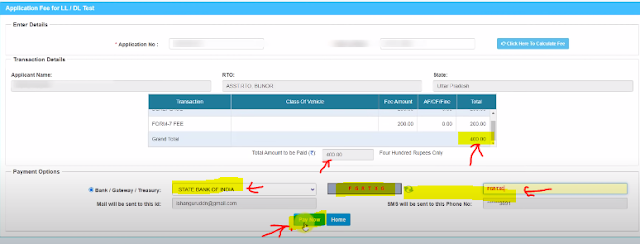
Step 18: Show your Card charge, select payment gateway name, enter captcha code after Pay Now button.


Step 19: Click on I Agree check box after click on Proceed for payment butotn.


Step 20: Here you have the option of net banking and card payment, which you can use if you like.


Step 21: Show your Payment transaction details and click on Click Here Print Receipt button.


Step 22: Click on check box button enter captcha code after click on Print Receipt button.


Step 23 : Show your original payment receipt print out, You have to take a print out of this and keep your pass. 


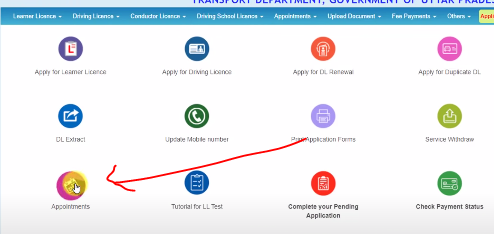
Step 24 : After payment you have to book an appointment


Step 25: Select LL/DL Services Slot Booking.


Step 26: Enter Application Number, Date of Birth, Captcha Code after then click on SUBMIT Button. 


Step 27: Click on Proceed to book button.


Step 28: Here you can book the slot for the date which Green is telling here, then you will get the time table on the right side, here fix the time of your slot and then click on the book slot button.


Step 29: In the security code, you have to enter the OTP which will have been sent on your mobile now, then confirm then click on the slot book button.


Step 30: Your slot has been booked, take a print out of the receipt


Now you have completed your online work, now you have to visit your RTO office with payment receipt, slot book receipt, any ID card, after document verification your driving license b


Thursday, February 10, 2022

New bike without number plate KITNE day Lo rode PE pass hai

Technically you should not. The temporary number is like a tag saying the vehicle is undergoing registration process. It is not a temporary permit for using the vehicle. Secondly, temporary numbered vehicles are not permitted use before registration to prevent any possible criminal activity. Those temporary numbers are almost all the same as making a unique temporary number is meaningless. It also becomes very difficult to track down the vehicle having such numbers in case of traffic voilations because the vehicle chassis and engine numbers are not affiliated to that temporary number. I suggest you avoid using a vehicle with temporary number. If you must use then carry your vehicle sale invioce and insurance papers ( if processed)

How many Kms or days I can ride my new bike with temporary number

I have driven my RTR 200 for least of 15 days with temporary. number plate,but with some required documents which are as follows,

1-bike invoice ,2-insurance,3-Road tax receipt,4-RTO motorcycle Reg. receipt.

So if u have all this documents & still you are using your bike on temporary. number then no worries,if any one stops you, you can show the rules of RTO on its web site.

However if you not have anyone of this documents then you can try your luck,

i once took my bike without any tax or Reg. receipts but no one stopped me,

& yes! i was wearing helmet(so i was following rules) so no one got a hint about the documents.

Also no need to worry about the KMS i have crossed it more then 150kms , just make sure your Reg. to be done within a Month of your bike delivery.

 I drove my FZS for 45 days (1200 KMs exactly) before I got my vehicle registered. But once I was caught by the traffic police and paid a fine of INR 650/-.

Maximum you can drive 60–80 KMs without registration. (Told by the traffic police who caught me)

If you go as per the Maharashtra RTO’s rules,

  1. The vehicle has to be registered with-in 7 days from the date of delivery. - My vehicle registration got delayed from the dealer side. I had complain to the YAMAHA customer care for delay.
  2. No dealer of vehicle can deliver the unregistered motor vehicle to the purchaser. He can only deliver the vehicles which are temporarily /permanently registered with R.T.O - But most of the dealers just paste sticker on the number plate with a temporary number which is common for all the bikes they sell.

So i suggest, better not drive your vehicle without registration number.

RTO has set a bevy of rules to follow but actually very few people abide them..Now after the purchase of a unregistered brand new bike the dealer will automatically give u a temporary number which will be valid for 30 days and legally u can drive your bike in this stipulated period without any worries but yes some unscrupulous cops can extort money from you in the name of checking so my advise is to run your bike during off time like in morning before 9a.m. and don't go in far off or unknown localities.

Vehicle insurance check by vehicle number

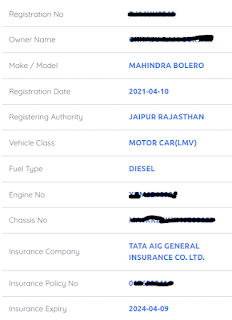
 If you also want to check the insurance of your bike, car, truck or bus, then how can you check it, from here you can get the full information of the insurance, that too only from the vehicle plate number, from here you can get insurance company name, insurance policy number, insurance You can find out the expiry date etc.


Vehicle insurance check by vehicle number

To check the insurance of your vehicle, follow the STP given below.

Step 1: Visit this link : Click Here

Step 2: Click on Know your vehicle details button, From here you can check the information of insurance

Step 3: Enter Your Vehicle Plate Number and verify Captcha Box, and click on Go button.


Step 4: On clicking the go button, the page will load, then you will get the information of the vehicle, in which the information of insurance will also come.


  In such a way, you can see the insurance information of any vehicle, from which you get information about whether the insurance is about to expire or not, as well as when you renew the insurance, then you need the insurance policy number.

Vehicle challan check without chassis number || Vehicle traffic challan status check without chassis number and Engine Number

Vehicle traffic challan status check without chassis number and Engine Number,Vehicle challan check without chassis number

If you also have the Challan Details of your Car or Bike, Bus, Truck, 2 (two) wheeler or 4 (four) wheeler Want to check but you do not have challan number, chassis number or engine number, you only know vehicle plate number, so how can you check the status of the challan, today we are going to teach, read the post completely.

Vehicle traffic challan status check without chassis number and Engine Number

Follow the given steps to check the traffic challan status from the plate number of the vehicle.

Step 1: Visit This Link : Click Here

Step 2: In Guidelines RC (Vehicle Related Service) see Advanced Vehicle e Challan CHEck option then click on it


Step 3: Enter Your Vehicle Registration/Plate Number and click on Check box verify captcha after click on Check e Challan Button.


Step 4: After clicking on Check e Challan button some processing will happen then you have to wait


Step 5: Here till today, if any challan has been deducted on this vehicle, then its record will come, here you will get the A to Z information of the challan.


Here you will get information like challan amount, date, payment mode, owner name, mobile number etc.


Here you will get Accused Name, Accused Father Name, Offence Name, Traffic Police
etc. information will come

Here Court Status, Challan Location, Transaction ID, Payment Eligible
etc details will show


Vehicle RTO Challan Information Check this by Registration Number

  • Registration No
  • Challan Status
  • Owner Name
  • Address
  • Chassis Number
  • Amount
  • Payment Date
  • eChallan Date
  • Challan Mode
  • Designation
  • eChallan Download
  • Mobile Number
  • Accused Name
  • Accused Father Name
  • Offence ID
  • Offence Name
  • Officer ID
  • Office Name
  • Traffic Police
  • Penalty
  • mva
  • mva1
  • Vehicle Class
  • Under Investigate
  • Payment Source
  • Sent to court on
  • Court Name
  • Court Address
  • Court Status
  • Court Status View
  • eChallan Source
  • For Online Payment CH
  • Transaction ID
  • Vcourt Eligible
  • Court Status
  • Vehicle Impound
  • State Code
  • Valid Contact No
  • Area Name
  • Office Text
  • Payment Eligible
  • e Challan Location Check